 Virgil
Dates, safe links, evidence weight, next-action ranking, correction lineage, and persistence use deterministic rules.
Virgil · Guide
Use Virgil
Save a passage, start a lesson and correct what Virgil thinks you know. These steps assume your installation and Chrome extension are connected.
Release 00091Open sourceSelf-hostable
In this guide
01 · Capture
Save your first passage
Open a page you want to learn from with the Virgil extension connected. You can save an exact passage or the whole page.
- Highlight the useful passage, or leave the page unselected.
- Choose Pin, or use Pick what to pin when several blocks belong together.
- Wait for the saved receipt in the side panel. One online selection opens its lesson there. A queued receipt means the pin is stored locally and still needs to reach your service.
Course sources arrive as proposals with exact source quotes. Dates that are ambiguous become questions. Nothing becomes a course objective, obligation or commitment until the learner confirms it.
Capture has a next step
The collection remains available from Board and My studies. Learn still opens on one recommended action instead of the whole backlog.
02 · Learn
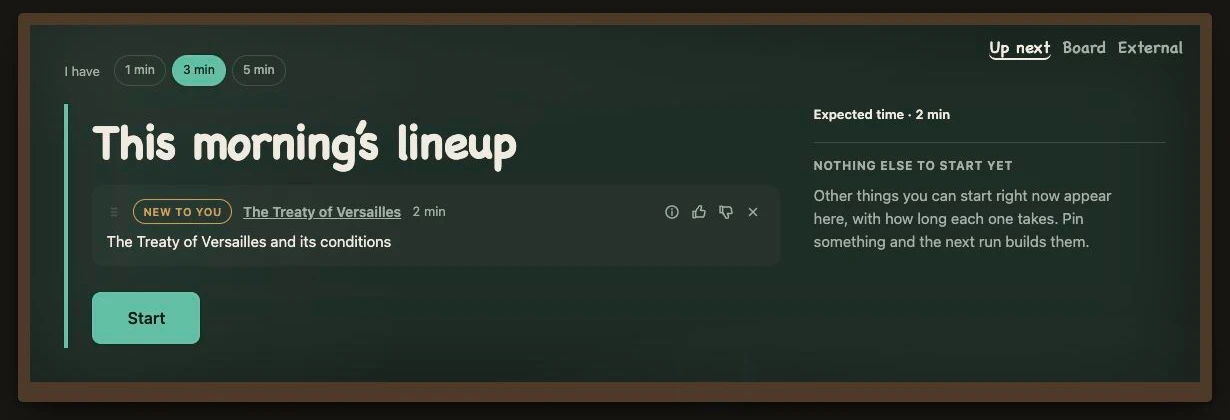
Start a short lesson
For a quick explanation of a saved passage, open its Quick take in the side panel. For a prepared lesson, open Learn, choose 1, 3 or 5 minutes, then select Start on the recommended action. Answer the recall check or record what happened after the activity.
Lessons may explain from nothing, rebuild something partly known, or go straight to a difficult boundary. They keep their sources visible and a separate verifier can withhold a defective section before it teaches.
Some skills need practice
Virgil can switch from explanation to action for auditory, practical and visual skills. A music interval may become a listening exercise. A code boundary may become a small test.
When Gemini, AI Mode, Gemini Notebook or another browser-carried agent is the better place to go deep, Virgil opens it only when asked, with the source and question prepared. Nothing is sent behind the learner's back. Virgil does not read answers back as authority; the loop closes when the learner records what happened under External.
Between lessons
What starts the background work?
Saved pins and learner actions can trigger processing. A confirmed intake or an explicit Process action starts the background job. Once started, it can continue in Google Cloud while you are away.
An additional scheduled sweep is optional and off by default. You do not need it for work triggered by pins and learner actions.
If no lesson is ready
First check the save receipt: a queued pin has not yet reached your service. Then check processing status and any reported connection or verification issue. In Settings, review processing, pause and model connection controls. An empty Learn page does not mean the saved material has disappeared.
03 · Grow
Correct what Virgil thinks you know
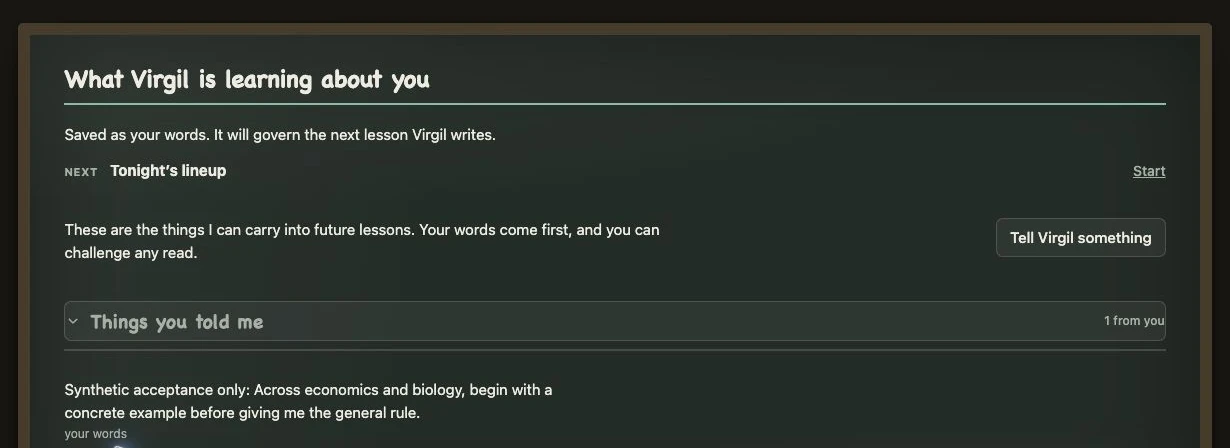
Open Insights to review what Virgil thinks you understand. Its conclusions are labelled my read; your own statements are labelled your words. Confirm a useful read, correct an inaccurate one or reject it. Use Tell Virgil something to add a teaching preference or explain what you still need.
What you saved on Tuesday can shape Thursday's three-minute lesson. Thursday's answer can change Friday's recommendation. Demonstrated work, feedback and outcomes outweigh an early self-assessment. Completion alone never becomes mastery.
Check that your correction appears under your words. It guides the next lesson. Background work may also propose new material, with the gap it is meant to address. Review a proposal before adding it to your studies.
One useful next move. Changed by evidence.
The models propose. Deterministic code ranks the next action, applies evidence policy and owns persistence. The learner can see what changed and why.
04 · Manage
Manage courses, deadlines and drafts
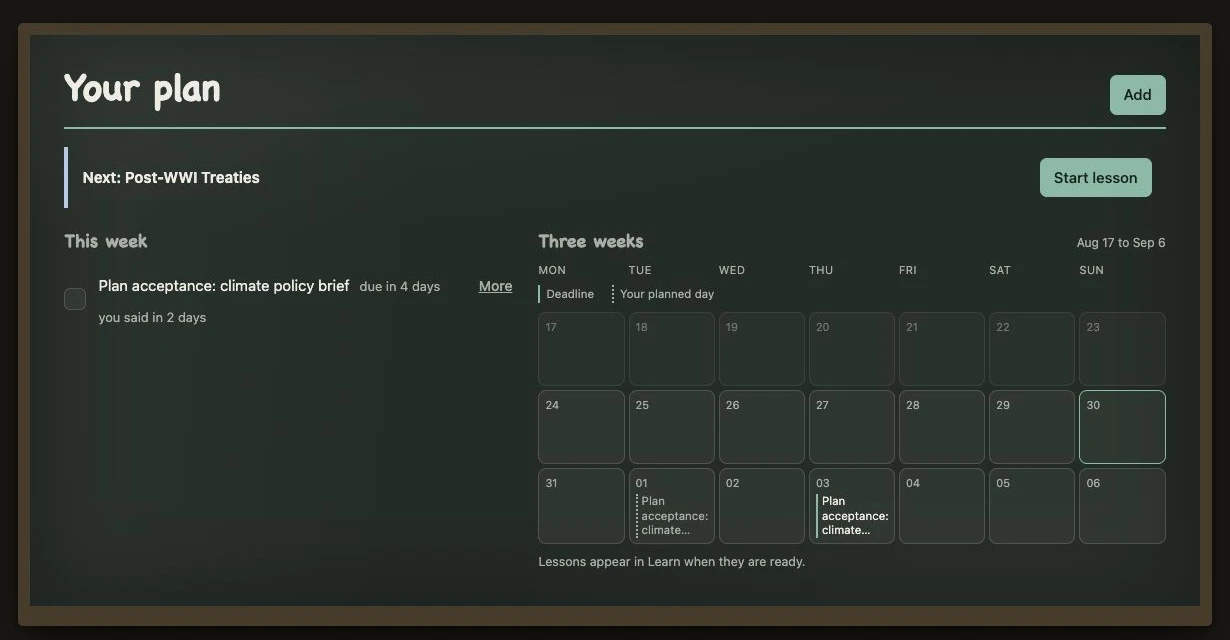
Board separates Get started, Currently learning, Recharging, Paused and Learnt. My studies holds courses and materials. Plan holds confirmed commitments and results. The full collection remains available, but Learn still opens on one useful move.
My studies holds the subjects and courses you are actively learning. Course sources can arrive as pasted text or a document drop. Virgil proposes objectives, obligations, dates, and questions as drafts. Nothing enters your plan until you review and confirm it.
- Add the syllabus, rubric, assignment brief, or other course source.
- Review the exact source beside each proposed objective or obligation.
- Answer any clarification question instead of letting an ambiguous date become a guess.
- Confirm only the items that belong in your course and plan.
Plan combines those dated commitments with the study time and work you add yourself. A due date can raise a topic's urgency, but it cannot erase the evidence about what you actually understand.
Paste your own work into Check a draft. Virgil reviews it against the assignment and the weak spots already visible in your learning record. It names the issue and points to the relevant passage. It leaves the writing to you.
When criteria are present, Mark checks one row at a time and quotes the learner's work for every verdict. One miss remains a send-back. Review and Mark never rewrite the answer, and neither changes the learning record unless the learner chooses a follow-up action.
05 · Customize
Manage access, models and privacy
Settings holds account access, model routes, connection checks, spend boundaries, processing cadence, pause, domain exclusions, backup and restore. The page theme has two choices everywhere: Whiteboard and Blackboard.
Each self-hoster supplies their own Google Cloud/Firebase project and model credentials. Google handles sign-in; Virgil receives no password. The owner can add or remove verified-email members under Settings → General → People. Members inherit that installation's server-side model and billing boundary while each Firebase identity routes to an isolated learner board.
Each model connection has assigned jobs, and a failed provider cannot spend through another connection. Pause and exclusion controls live where the learner can inspect them, not behind a hidden administration route.
Architecture diagram
How the background work runs
The service handles immediate requests. Longer processing runs as a separate job. Open the map for the stages, model routes and checks, or read the submission architecture.
Show the engineering map and checks
Virgil system mapOne learner loop, two execution speeds
15 named agents11 background stagesGoogle Cloud live
01Learner loopwhile somebody is waiting
Chrome MV3Extension + hosted boardCapture · Learn · Grow · Manage · Customize
Cloud Run serviceAuthenticated APIIngress · safe links · dates · evidence policy · next-action rules
FirestoreOne learner boardSources · topics · plans · outcomes · certainty · sessions
02Background lanewhile nobody is waiting
Learner-owned workStart processingA confirmed intake or explicit Process action wakes the lane
Cloud Run Jobs APIDurable executionManual and event-driven starts; optional schedules remain paused
Cloud Run JobGoogle ADK hostSequentialAgent receives the real stage bodies
01IntakeIntake Planner
02ForageForager
03ClusterClusterer
04SurveySurveyor
05AnalyseAnalyst
06ComfortRegistrar · pure
07StatementsRegistrar
08ProspectProspector
09GardenGardener · pure
10ComposeComposer
11VerifyVerifier · withhold
03Model routingshared by both speeds
One LLM portEvery model call crosses hereRefusals return a typed result
Explicit routingQuick · Deep · ImagesCloud/API by default · Local and Agent CLI optional
Spend + credential guardFree key firstPaid hop checked before money can move
Google Gemini3.5 Flash-Lite · 3.6 FlashExact answering model stays visible
04Return pathevidence changes the product
Verified writesSources + outcomesAssessed evidence outweighs completion and points
Visible adaptationToday · Plan · InsightsThe learner can see what changed and why
Optional exportsThree use-moment documentsDrive or local folder · rewritten in place
Defective or unverified work is withheld. The authoring model cannot approve its own repair.
Model-backed stages can fail independently. Storage policy fails closed when state cannot be trusted.
The next recommendation names the evidence that changed the learner record.
Production receipt
The Cloud Run Job has executed all eleven stages under Google ADK against Firestore and composed a verified session through Gemini 3.5 Flash-Lite and Gemini 3.6 Flash. The public repository includes the self-host path.